Storyblok CMS
I've tried a few Content Management Systems over the years: Prismic, Hygraph (formerly GraphCMS), Sanity, Payload CMS (very briefly), and now Storyblok. I've mainly been using them for easy creation of blog posts so the rich text editor is one of the most important things for me.
Rich Text options for each CMS:
Prismic
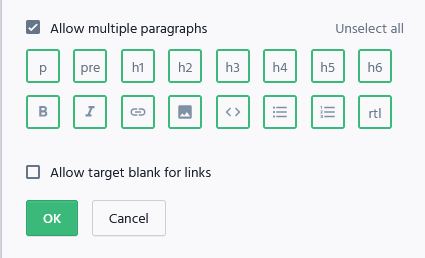 You can see this is pretty limited out of the box. There's no table, code block, or inline code option. I used Prismic a few years ago, but when I logged in today these are the same options I had. Maybe there's developer customizable options but I've long moved off of Prismic that I don't want to dig into it.
Hygraph
 There's lots of options built in here! Inline code, code block, tables, iframe, block quote, images, lists, subscript, superscript. I really liked using this and it's built around graphql which I'm a fan of 😀
Sanity
 Sanity seems very popular among developers, but out of the box it's more limited than Hygraph. It takes a lot more work in setting up to get to a comparable state but as a tradeoff you get full control over the frontend. I thought this would be a good switch for me but the blog is only a small portion of my site so I did not want to invest the time into setting things up (like Tables). Even to render images in the "rich text" (which is actually portable text) I had to write custom code for. So after that I looked on for a new CMS. Briefly took a look at Payload CMS but that requires self hosting for the free tier and again, the blog is only a minor part of my site for me to try out different things, so I didn't want to deal with the hassle of maintaining that. So then I tried Storyblok.
Storyblok
 Most options out of the box! I thought I'd have to fix some of the rendering for some of the things I used like images / code blocks but pretty much everything worked when i used the render function of the
 useStoryblokRichText() hook. Text alignment, images, code blocks, inline code, and tables all worked. The only thing so far I had to update is to write a resolver for emojis, but the other CMS didn't even have the option to use emojis 😅
Summary
My favorite 2 are Hygraph and Storyblok. Storyblok has the most options out of the box for non developers and was one of the quickest for me to set up. It required probably the least number of developer config overrides for the rich text.
One caveat: Storyblok seems to lag over time when I use the rich text input editor in Firefox just typing a few sentences to the point where it's unusable. I noticed there are a lot of requests to posthog as well as I type. The lag is not an issue in chrome but the POSTs to posthog is still happening quite frequently.