Setting up an OPNsense router
Why OPNSense?
I had been using an old Asus RT-AC68U running Asuswrt-Merlin for my router for the longest time. Maybe 15+ years? Definitely over 10 years. It was rock solid and still usable to this day. However, I was starting to get low NVRAM warnings and the wifi was starting to get more unstable. My house is not that big and I got Ethernet wired to all the rooms I wanted it in so I had no need for a mesh system. Plus I wanted to have more control over my router and I didn't want to have to install a separate Pi-hole for network wide ad-blocking when I could do it on my router. So I did some reading and narrowed my choices down to 3 options: Ubiquiti, OPNSense, or MikroTik.
I'm not a network expert at all but from my reading I got the general sense that Ubiquiti can be really good but you're paying a lot of money for okay hardware with pretty good software (though there were complaints about losing support and bugs). I almost bought a UDM-SE (Dream Machine Special Edition) as it has a POE switch built into it as part of the router. But that thing is $500. That plus the access point would be at the minimum another $160. Even if I could get them off facebook marketplace which I'd been monitoring for a while, the cheapest would have been about $540 total.
From what I read about OPNSense and Mikrotik, software capabilities for both are all around much more than what Ubiquiti offers. That with the combination that you can choose however powerful hardware you want was nice. The UI is not as nice as Ubiquiti, but it's still decent on OPNSense at least. I ended up going with OPNSense as it seemed to be primarily a firewall and THEN a router whereas Mikrotik was primarily a router with some firewall capabilities. Plus it has a nicer UI and gets updates pretty frequently.
My hardware
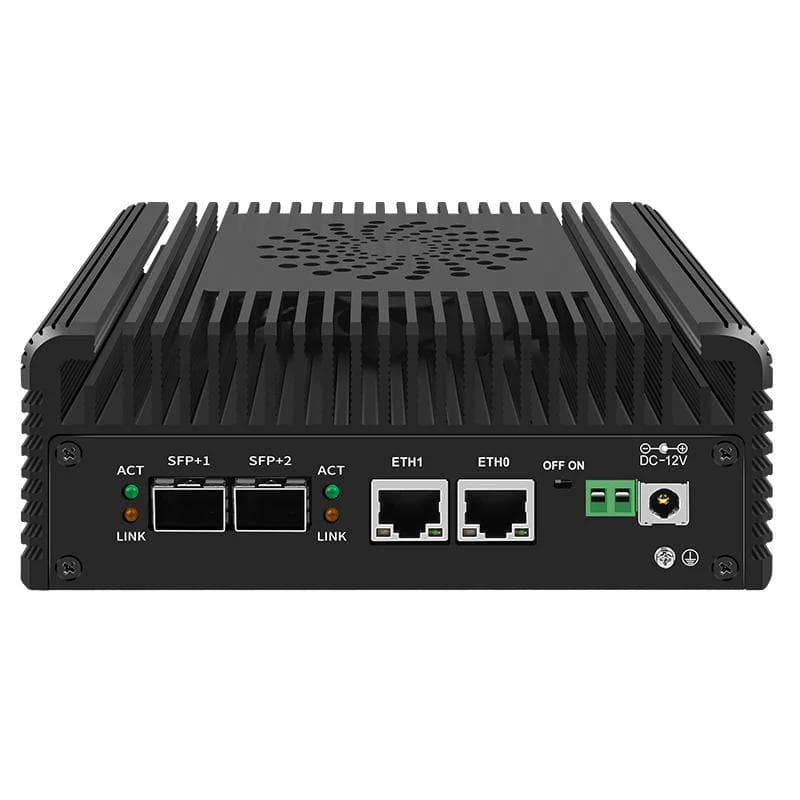
I ended up purchasing a CWWK N100 router with 2x10G SFP+ 2xi226-V 2.5G. It cost me about $200 after discounts and taxes. There are many great guides to installing OPNSense on N100 devices so I'm not going over that. I also purchased a TP-Link EAP670v2 for my access point as really only my desktop had Wifi 6E and my Pixel 8 has Wifi 7. All the rest of the devices in my house are lower speeds. Plus I'm only paying for gigabit internet. The nice thing about the EAP670 is that it was only $120 (compared to Ubiquiti's U6 Pro which is $160) AND it can be powered via POE+ OR an included power adapter that plugs into a wall outlet. In addition to that, I had a cheap TP-Link 8 port unmanaged switch.
Running my OPNSense router behind the AT&T Gateway
I ran into 2 main issues setting this up:
Accessing the router from my machine that was directly connected to the router
I couldn't access the internet from my computer but my router was able to download updates
Fixing #1:
I had an old AT&T Gateway. The Pace 5268AC Gateway. For some reason, the Ethernet could not be connected directly to the OPNsense router i226V WAN port. None of the LEDs on the OPNSense router WAN port were lighting up. It took me longer than it should have but I finally figured this was the issue after I experimented with my setup and changed it to be:
AT&T U-Verse Pace 5268AC Gateway -> Unmanaged Switch -> OPNSense Router -> My computer (for testing)
I'm guessing the Pace 5268AC ports were too old to work with the newer i226V ports. So I requested a newer gateway from AT&T and received the BGW320 which does work with the i226V ports.
Fixing #2:
After resolving #1, it took me the longest time to figure out the right OPNSense settings so my computer could access the internet behind the OPNSense router and the AT&T Gateway. Here's what I had to do (after the initial wizard setup):
Login to your OPNSense router and modify these settings:
The Static IPv4 address should be what you had chosen for your router. I opted to use: 192.168.2.1
Bonus:
AdGuard Home - this was a plugin I could install on my router. No need for a separate Pi-hole or anything like that. It gives me full control over blocklists and what I want to block for all network devices or even individual devices. I realized my Sony A80J was always trying to send data to Samba Interactive TV despite me never enabling it nor agreeing to the Terms of Service and Privacy Policy and AdGuard Home was successfully blocking it. For those who don't know, Samba LOOKS AT YOUR SCREEN so they know what you're watching so they can sell your data to advertisers.